AI Image prompt
Transform your child's photo into a stunning double exposure movie poster featuring three artistic portraits while preserving the exact facial features, expression, and identity. Designed with a modern cinematic style, clean grey background, white paint splash effects, and premium studio-quality lighting for an ultra-realistic, high-end poster.
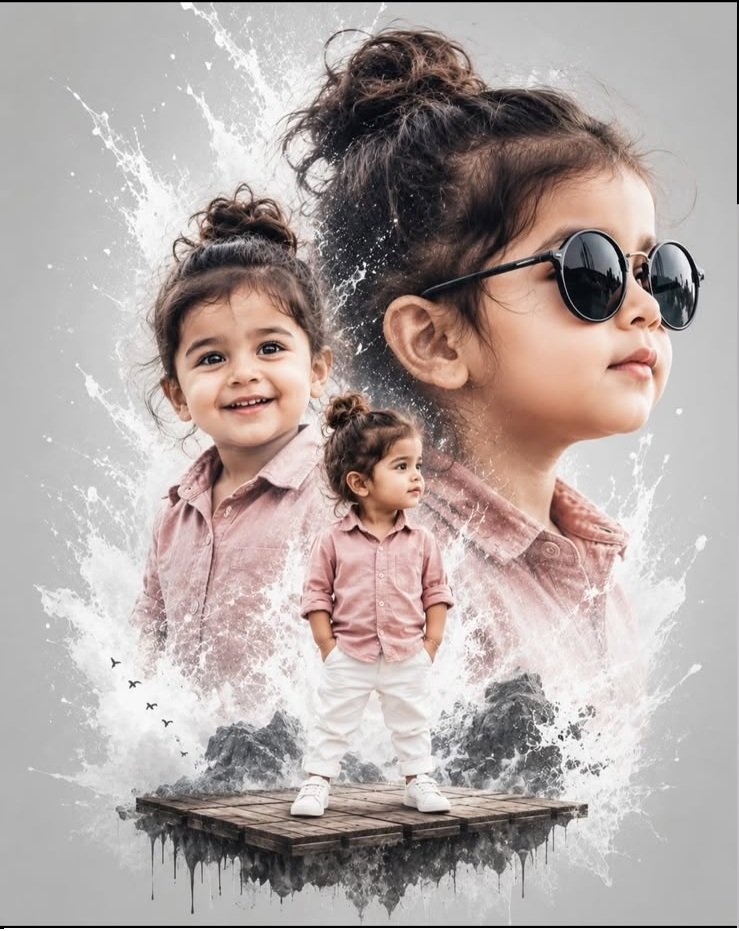
The appeal of this poster is in the contrast: a small child in a soft pink outfit, a cheerful close-up and a larger profile with round black sunglasses. Each view brings out a different part of the portrait, while the grey background keeps the artwork calm and uncluttered.
Use the prompt on this page to request a version featuring the child in your own photograph. The website sample shows the intended styling. Your uploaded image provides the reference for the child's face, hair and natural appearance.
The design combines three views of the same child within one blended poster. Although the prompt calls it “double exposure style,” its composition instructions ask for three portraits, with overlapping layers rather than separate photo panels.
The standing portrait shows the full outfit: a dusty pink shirt, white trousers and white sneakers. A floating wooden platform provides a small, imaginative base beneath the child's feet.
The smiling medium close-up brings the face nearer to the viewer. It should retain the child's familiar features and a natural expression, with the eyes visible.
The large profile portrait adds scale behind the other views. The black round sunglasses belong to this side-facing portrait and give it a different character without replacing the child's likeness.
White paint splashes connect the layers against a clean grey background. Their role is to add texture around the portraits while leaving important facial details readable.
Your photograph is uploaded in ChatGPT. The sample on this website is a preview of the effect; it is not the identity reference for your child's portrait. Image generation and editing need to be available in your ChatGPT account or workspace.
Start with a clear, uncovered face. Visible eyes, a recognisable hairstyle and natural skin detail give you useful features to compare with the finished poster. Sunglasses can be added later, so they do not need to appear in the original photograph.
The child's original clothes and background can be different. The prompt asks for the outfit, platform and grey setting to be introduced during the edit. If your source is a tight facial close-up, remember that the body and standing pose will need to be created. A photograph showing more of the child can provide additional visible information for that view.
This particular prompt is written for a child around two years old. The result should keep the child's apparent age, soft facial proportions and natural appearance. A more polished poster should not mean an older-looking face or an artificially reshaped smile.
Compare the uncovered close-up with your source photo first. Then check the standing portrait and the side profile. The same shirt across all three layers can make the design feel consistent even when the facial features have drifted.
If a correction is needed, try:
Keep the child's facial features, hairstyle, natural skin tone and apparent age based on the original uploaded photograph. Use the same identity in all three views. Retain natural skin texture and a gentle smile without changing the facial proportions.
A smiling view and a new profile angle may differ from the original expression. If the source does not show the side of the face, that angle has to be inferred. Review it carefully; an exact likeness in every view cannot be guaranteed.
The layout needs a balance between the three portraits. A large background profile can give the artwork its shape, but it should leave room for the smaller standing figure and the smiling close-up.
The prompt does not set a fixed aspect ratio. If you want a portrait-shaped poster, request that framing while keeping the full body, shoes and platform inside the canvas.
You can keep the main concept and make a small change to suit the child's photograph or the way you plan to use the artwork. These are suggested variations to try, not tested results.
When changing the smile, describe the expression rather than asking ChatGPT to make the face “cuter.” A small, relaxed smile gives a clearer direction while keeping attention on the child's existing features.
Ask ChatGPT to use the original uploaded photograph as the identity reference for every view. Identify the portrait that needs correction and request that the successful parts of the composition be retained.
Request three distinct faces with no facial overlap. Keep the blended treatment around shoulders, clothing edges and paint effects instead.
Specify that only the large side-profile view wears black round sunglasses. Ask to leave the standing figure and smiling close-up uncovered.
Refer back to the source photograph and ask to retain the apparent age, facial proportions and natural skin texture. Review the smile and jawline as well as the eyes.
Request a correction to the full-body layer, with both feet resting naturally on the visible wooden surface. Check the revised shoes and leg positions before saving.
Ask for exactly three views, fewer paint splashes and clearer space between the main facial areas. If the result is a photo grid, clarify that you want one overlapping poster composition without panel borders.
These adjustments describe what to request; they do not guarantee a particular correction. Inspect the revised image because details outside the requested area may also change.
Look at the complete artwork at the size you expect to display it. You should be able to recognise the child, distinguish all three views and see the standing figure without searching through the paint effects.
Then inspect the image more closely. Check hands, shoes, glasses, the smiling mouth and the edges where portraits meet. Make sure a paint mark has not been interpreted as an extra facial feature or body part.
If the artwork is for a birthday invitation or keepsake, add lettering after you are satisfied with the portrait. Check the downloaded image dimensions against your intended display or print size. The movie-poster styling itself does not specify the file's resolution.
Yes. The child in your photograph supplies the appearance. The shirt colour, sunglasses and layered arrangement describe the styling, rather than requiring a change to the child's identity.
The standard workflow uses one clear photo with the copied prompt. If you choose to supply additional photographs of the same child, explain which one should guide the main likeness and which shows another angle.
No. The floating wooden platform is an artistic addition requested by the prompt. The full-body pose and contact between the shoes and platform still need to be checked in the result.
You can request it. If preserving the expression is more important than creating a new smile or profile, ask ChatGPT to retain the original expression and head angle while adjusting the poster around it.
The sample illustrates the intended design. Your source photograph, generated poses and portrait blending will make the result individual. Aim for a recognisable likeness and a balanced composition rather than an identical copy.