AI Image prompt
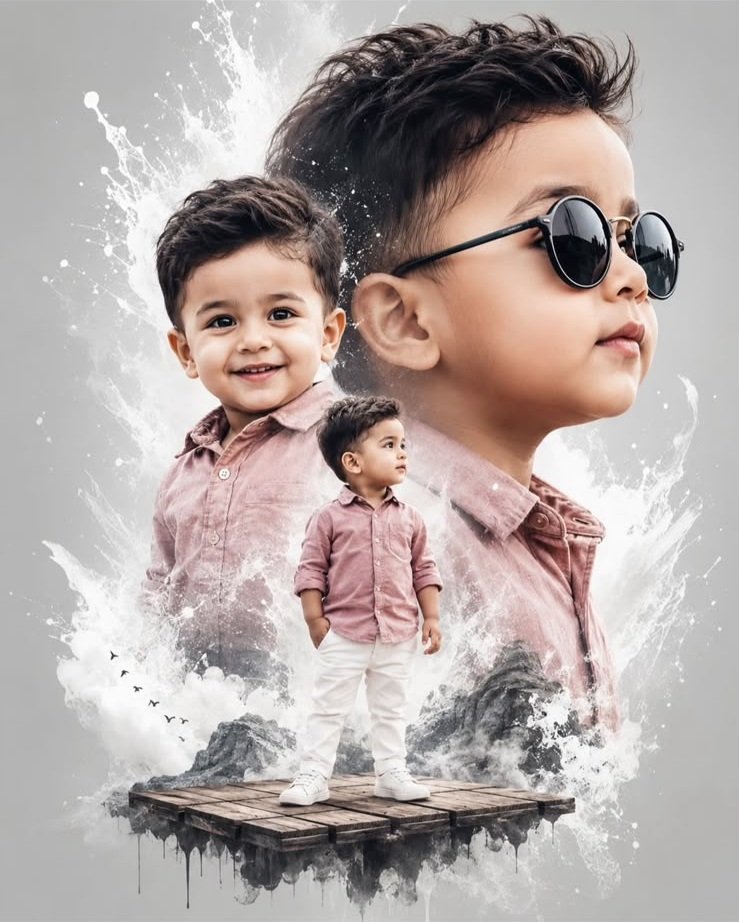
Create a stunning double exposure-style movie poster using the uploaded photo while preserving the exact facial features, skin tone, hairstyle, and identity. The artwork features three cinematic views of a 2-year-old boy or girl: a full-body portrait standing on a floating wooden platform in a dusty pink shirt, white trousers, and white sneakers; a smiling medium close-up; and a large side-profile wearing stylish black round sunglasses. Set against a clean grey background with artistic white paint splash effects, this ultra-realistic composition delivers a premium movie-poster look with high-end cinematic quality.
A small standing figure, a familiar smile and a large side profile give this child portrait three different points of interest. The dusty pink outfit and grey background keep the colours gentle, while white paint splashes bring movement to the composition.
This ChatGPT prompt is intended to turn your uploaded toddler photograph into a blended movie-poster-style artwork. The sample on this page shows the visual direction. Your own uploaded photo supplies the child's appearance for your version.
Here, “double exposure style” describes the layered, blended appearance. The prompt requests three views of the same child inside one composition. The result should read as a designed portrait, rather than three different children standing together or a grid of separate photographs.
| View | What it adds | Details to retain |
|---|---|---|
| Full-body portrait | Shows the outfit and gives the poster a clear foreground figure. | Dusty pink shirt, white trousers, white sneakers and a floating wooden platform. |
| Smiling medium close-up | Brings the child's expression into focus. | A natural smile, visible eyes and facial features based on the uploaded photo. |
| Large profile portrait | Creates the larger background layer and the poster's distinctive silhouette. | A side-facing view with black round sunglasses, consistent hair and a recognisable facial outline. |
A useful arrangement is to let the large profile sit behind the smaller standing figure, with the smiling close-up as a secondary layer. Keep the faces distinct even where clothing edges and paint textures blend.
The photograph is uploaded in ChatGPT. This website provides the example and the prompt; your photo becomes the personal reference for the edit. Image generation and editing must be available in your ChatGPT account or workspace.
Choose a photo where the child's eyes, cheeks, nose and hairstyle are easy to see. An uncovered face is particularly helpful because the poster includes both a smiling portrait and a sunglasses portrait. A heavily filtered or blurred photograph gives you less visible detail to compare later.
You do not need a photo taken on a wooden platform, and the child does not need to wear the pink-and-white outfit in the original picture. Those elements are part of the requested transformation.
A close-up can guide the face, but it does not show the child's full build or standing posture. If you have a clear photograph showing more of the body, it can provide additional visible information for the full-length view. Parts missing from the source photograph will need to be created.
The prompt is designed around a child of approximately two years old. The portrait should retain a toddler's appearance rather than introducing an older face, exaggerated jawline or adult body proportions.
Compare all three faces with your uploaded photograph. Pay attention to the cheeks, nose, mouth shape, hairstyle and skin tone. The sunglasses conceal the eyes in the profile view, so use the uncovered smiling portrait for a clearer comparison.
If the edit makes the child look older or noticeably different, try this follow-up:
Use the original uploaded photo as the identity reference for all three views. Preserve the child's facial proportions, hairstyle, natural skin tone and apparent age. Keep the toddler appearance and avoid exaggerated facial reshaping or overly smooth skin.
A new smile or side angle may require changes from the original photograph. The aim is a consistent, recognisable child across the artwork; a perfectly unchanged face from every viewpoint cannot be guaranteed.
The clean grey background leaves room for the portraits to stand out. White paint splashes can connect the layers around the shoulders or outer silhouette, while the faces stay clear. Too much texture across the eyes or mouth can weaken the likeness.
The white trousers, sneakers and paint effects need some separation. Gentle shadows and a little tonal contrast can help stop the outfit from disappearing into the surrounding white shapes.
The wooden platform adds a small fantasy element. It should be clearly visible beneath the standing child's shoes, with both feet positioned convincingly on its surface. A subtle shadow can help the platform feel like a deliberate part of the design.
Since the prompt does not specify an exact aspect ratio, choose a portrait-shaped composition if you want a poster layout. Ask to keep the full-body figure, sneakers and platform inside the frame instead of stretching or squeezing the child to fit.
The black round sunglasses belong to the large profile view. Leaving the other two faces uncovered gives the poster variety and makes it easier to see the child's expression.
If the glasses appear in every view, use a focused correction:
Keep the black round sunglasses only on the large side-profile portrait. Leave the standing portrait and smiling close-up without sunglasses. Retain the child's likeness, outfit and existing composition.
Also inspect the glasses themselves. The frames should fit the profile naturally, without merging into the cheek, ear or hair.
The original palette works as a restrained starting point. If you want a variation, make a specific request while retaining the child's identity and the three-view composition.
For a different expression, describe the smile you want rather than asking for a broadly “cuter” face. A gentle smile is a clearer direction and does not call for changing the child's facial structure.
Start with the complete poster at a comfortable viewing size. The full-length figure, smiling portrait and larger profile should be easy to distinguish. If one layer overwhelms the others, request a smaller scale or softer background treatment for that layer.
Then zoom in. Check the hands, shoes, platform edges and sunglasses. Make sure paint splashes have not turned into extra fingers, facial marks or unwanted shapes. Look at the smiling mouth too, especially if the original photograph had a different expression.
Finally, compare the faces side by side. Similar clothing can make different-looking faces seem consistent at first glance. If one portrait drifts from the reference, ask for a correction to that view and state which parts of the composition you want to retain.
The following are suggested adjustments to try, rather than verified results from this particular prompt.
Make a targeted revision in the same ChatGPT conversation, then inspect the new image again. Asking to retain the successful layers helps communicate your priorities, although other details may still change.
Yes. Use the child's photograph as the reference and ask ChatGPT to retain their appearance and hairstyle. The pink shirt, white outfit and layered arrangement describe the styling rather than requiring a different identity.
No. The prompt asks for sunglasses to be added to the profile view. A clear, uncovered face is useful as the main identity reference.
Not necessarily. If the source photo does not show the side of the face, that view must be inferred from the available reference. Review it carefully and request adjustments if it looks unlike the child.
In this prompt, the phrase describes the blended poster treatment. The composition instructions explicitly ask for three views of the same child.
You can adapt the artwork for that layout. Leave room for text and check the downloaded image dimensions against the size you intend to display or print. The generated artwork should be reviewed before adding it to a finished design.
The goal is a similar layered style featuring the child from your photo. Facial angles, expressions, clothing details and paint effects can vary, so judge the finished portrait against your original photograph as well as the sample.