AI Image prompt
Transform your reference photo into a stunning ultra-realistic 4:5 cinematic collage featuring three emotional scenes on a rainy road. Preserve the subject's exact facial features, hairstyle, skin tone, and expression while showcasing premium DSLR-quality visuals with reflective wet roads, soft rain, foggy greenery, dramatic HDR lighting, and a viral Instagram aesthetic. Perfect for creating high-end, movie-like portrait edits.
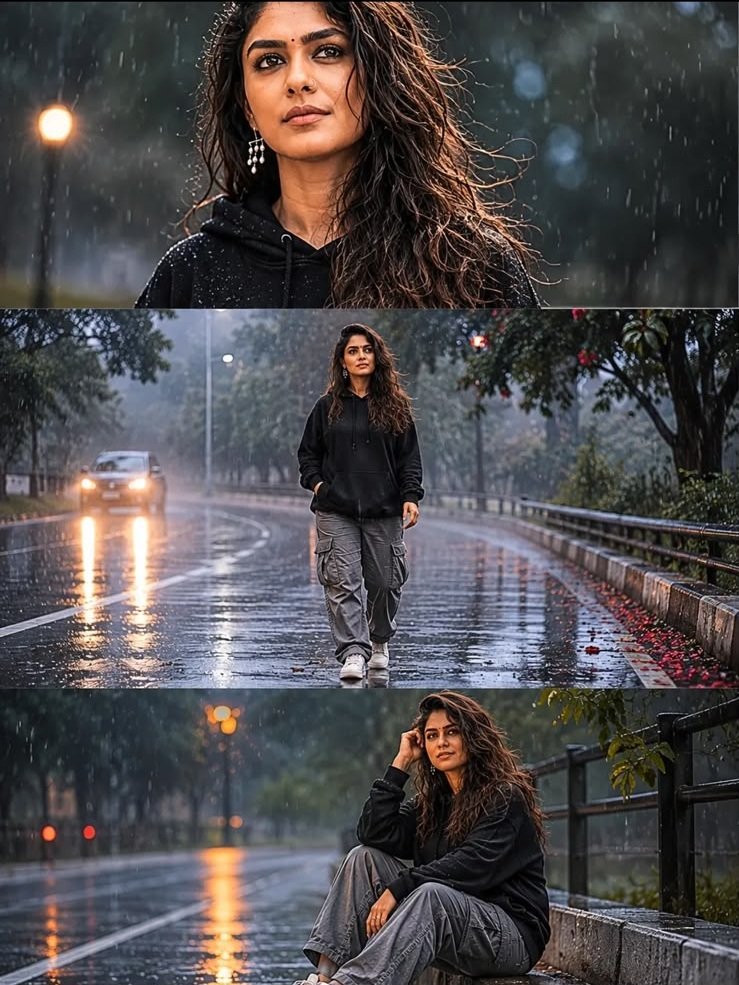
A wet road, an oversized hoodie and a quiet moment beside a bike: this photo effect builds a small story around the person in your uploaded photograph. Instead of one portrait, the prompt asks ChatGPT to create a vertical collage with three connected scenes.
The sample on this page gives you a preview of the intended atmosphere. Copy the prompt, open the ChatGPT link below it and upload your own photo to request a version based on your appearance. The aim is the same rainy-day visual treatment with your likeness, rather than an identical copy of the sample.
The three scenes should feel like moments from the same outing. The black oversized hoodie, grey cargo pants and sneakers connect them, while changes in framing give each panel a different purpose.
The opening scene focuses on your face as you look toward the sky. Small raindrops, visible skin texture and soft daylight establish the mood. This is the panel where likeness will be easiest to judge, so keep the face clear enough to recognise.
The second scene gives the surroundings more room. You are walking alone, with wet asphalt, green trees, puddles and light fog creating depth. The road should help lead attention toward you instead of becoming a brighter, more distracting subject.
The final scene brings the story to a slower moment: you are sitting beside a bike, looking thoughtful. Keep the outfit, hair and overall lighting consistent with the earlier panels so the collage reads as one sequence.
Soft transitions can connect the scenes, but the three moments should remain distinct. Blending them too heavily may make the person or bike appear to overlap between frames.
Your photograph belongs in the ChatGPT conversation. The image on this website is the style preview; it does not replace your personal photo reference. Image editing must be available in your ChatGPT account or workspace.
A clear photo with visible eyes, an unobstructed face and a recognisable hairstyle is a useful starting point. Heavy filters, sunglasses or strong shadows can hide details you want the edit to retain.
The original background does not need to be a rainy road, and you do not need to be wearing the requested outfit. Those are changes described by the prompt. A head-and-shoulders photo can guide the face, but body details outside that crop will need to be created for the walking and seated scenes.
If keeping your body shape is important, choose a photograph that shows more of your build. Review the finished proportions alongside the face rather than judging the collage by its atmosphere alone.
Compare the panels with your original photograph and with one another. Look at the jawline, nose, eye spacing, hairstyle and skin tone. A similar outfit is not enough if the face appears to change from one frame to the next.
The prompt combines an unchanged expression with different poses and an upward gaze. Those instructions can pull in different directions. Keeping facial identity consistent is a clearer goal than requiring every facial detail to remain frozen while the camera angle changes.
If needed, follow up with this instruction:
Use my original uploaded photo as the facial identity reference for all three panels. Preserve my facial proportions, hairstyle, natural skin tone and skin texture. Allow only the head and gaze changes needed for the three scenes.
The wording also includes “brown skin.” For a portrait faithful to your appearance, give priority to the skin tone in your uploaded photo. If the complexion changes, ask ChatGPT to preserve your actual skin tone rather than applying a fixed colour description.
This concept calls for bright overcast daylight. Deep night-time shadows, neon signs or heavy storm clouds would create a different mood. The intended scene stays readable, with a pale cloudy sky, visible greenery and soft light across the face.
Because the prompt mentions both “after rain” and visible rain particles, a coherent interpretation is a recently soaked road with a little remaining drizzle. If the result looks like a heavy downpour, ask for lighter rain while retaining the wet surfaces.
Road reflections should echo the sky, trees and nearby surroundings. If they become bright neon streaks, request softer daylight reflections. Keep some texture in the asphalt and puddles so the road does not resemble a polished mirror.
The 4:5 instruction applies to the complete collage: four units wide and five units tall. The three scenes sit inside that single vertical image. They are not three separate 4:5 pictures.
A canvas of 1080 by 1350 pixels is one example of those proportions, not a promise of the generated file dimensions. Check the downloaded image if an exact ratio matters for your intended use.
If ChatGPT produces a grid or separate images, request:
Arrange exactly three horizontal scenes stacked from top to bottom inside one vertical 4:5 collage: looking upward, walking on the wet road, then sitting beside the bike. Keep faces naturally proportioned and transitions subtle.
The quiet atmosphere comes from a few connected choices. Change one at a time if you want a personal variation.
To change an expression, describe the visible result you want, such as a relaxed mouth or a thoughtful gaze. Broad words like “emotional” leave more room for interpretation.
First, look at the whole image. Can you read the sequence from top to bottom? Do the scenes share the same weather and colour treatment? Is the person still the focus at a small display size?
Then inspect each panel closely. Compare the face with your original photo, check that the hoodie and trousers remain consistent, and look at hands, feet and the bike’s wheels and frame. A strong overall mood can make these smaller errors easy to overlook.
Ask for a focused revision in the same conversation. For example: “Correct the face in the bottom panel using my original uploaded photo, while retaining the layout, clothing and daylight appearance.” Review the revision again, since other details may also change.
These are suggested adjustments, rather than a record of tested fixes.
“Nikon Z9 DSLR realism” describes the photographic look being requested. It does not mean that the generated picture was taken with that camera.
Likewise, “20MB photo quality” does not set a reliable download size or prove image quality. Check the actual file dimensions and visible detail. File weight alone does not tell you whether the face is sharp or the collage is convincing.
“Premium HDR lighting” and “ultra-sharp details” express a desired finish. If the skin looks harsh or reflective surfaces become too bright, ask for softer highlights and more natural contrast. “Viral Instagram mood” describes an aesthetic preference, not a prediction of reach.
An exact likeness, identical expression or identical result across generations cannot be guaranteed. Use the sample to choose the style, then judge your version against your own photograph.
No. Upload a clear photograph of yourself. The copied prompt asks ChatGPT to introduce the rainy-road setting, outfit and three-scene composition.
The normal process uses your own photo and the copied prompt. The sample helps you choose the look. If you later attach it as extra guidance, identify your photo as the person reference and the sample as the style reference.
Yes, you can request a natural expression rather than an exaggerated emotional pose. If keeping the exact expression is your priority, ask to retain the original head angle too, and accept a less dramatic change in viewpoint.
Specify “motorcycle” or “bicycle” in a follow-up message and ask to retain the rest of the collage. You can also describe a preferred colour or simpler vehicle design.
The aim is a similar three-frame rainy-day style featuring your appearance. Your source photograph, the pose changes and the generated surroundings will make the result individual.