 Exam Study Visual
AI image prompt
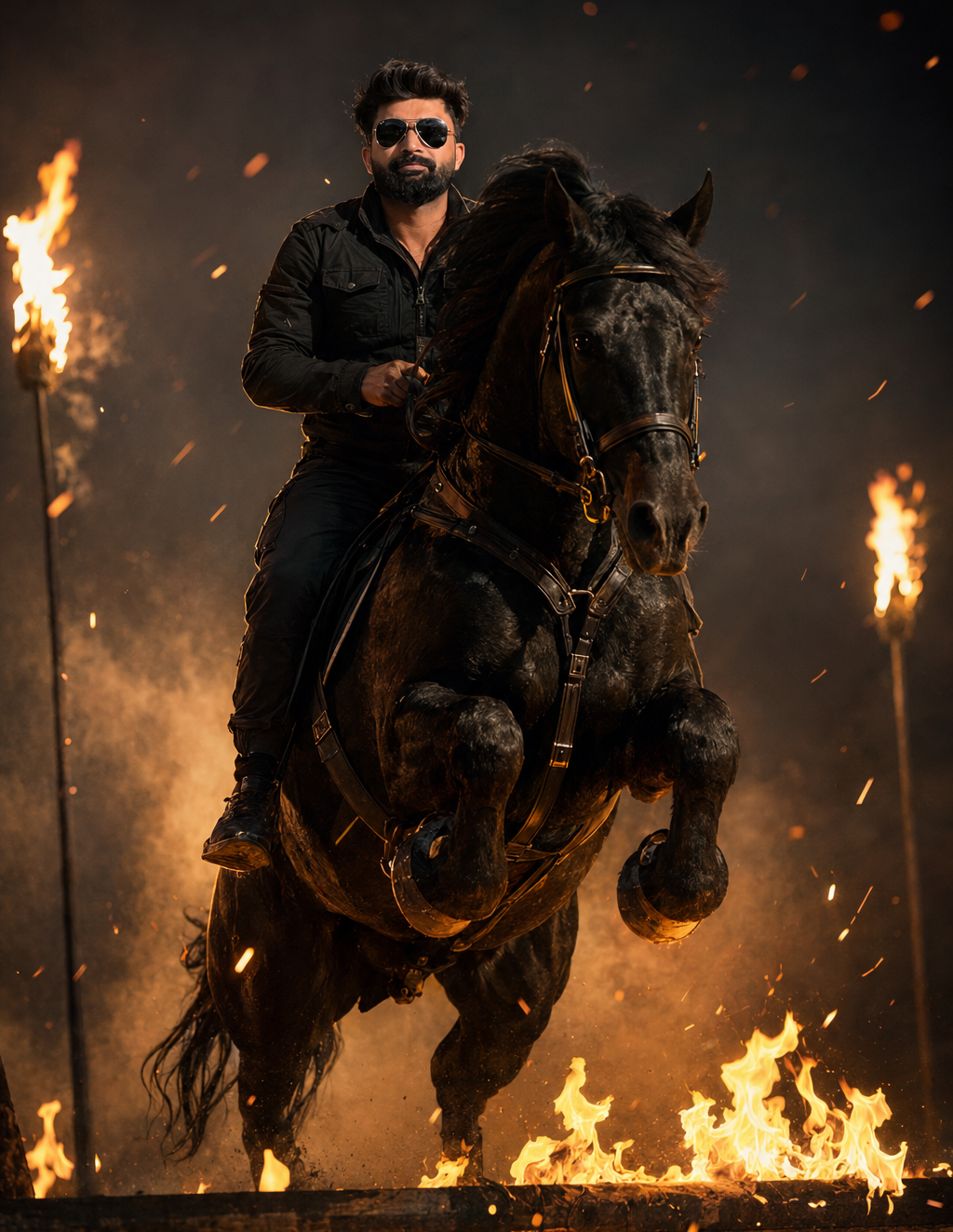
Cinematic Fire Horse Rider Portrait : Transforms your reference photo into an ultra-realistic cinematic scene of you riding a black horse through a fire-lit battlefield with Hollywood movie-quality visuals. How To Use : 1. Select a high-definition, clear photo where your face is fully visible. 2. Open ChatGPT using the link provided below. 3. Click the Copy Prompt button (or copy the prompt manually). 4. Paste the prompt into the ChatGPT message box. 5. Click the + (Attach) button and upload your photo. 6. Send the message and wait a few moments while ChatGPT generates your cinematic image. Tip: For the best results, use a well-lit, front-facing photo with your face clearly visible.
Exam Study Visual
A convincing fire-lit rider portrait needs more than large flames. Your face should still look familiar, the black horse should have a clear silhouette, and the light should connect you naturally to the scene. Those details give the image its cinematic character.
This ChatGPT photo-editing concept places the person from your uploaded photograph on a black horse in a fire-lit battlefield setting. The sample on this page helps you choose the look. Your own photo supplies the reference for your appearance.
The intended artwork brings together three elements: a recognisable rider, a black horse and an atmospheric background lit by fire. The rider and horse should be easy to read, with the surrounding action providing context.
Firelight can introduce warm highlights across the face, clothing and horse. Darker areas give those highlights room to stand out. If the flames become the brightest and largest part of the image, a useful refinement is to move them farther behind the main subjects.
The description sets the overall concept. The copied prompt controls any more specific choices about clothing, camera angle, scenery and the horse's pose. You can refine those details after reviewing your first result.
Your photograph is uploaded inside ChatGPT. This website provides the sample and prompt; the photo you attach becomes the personal reference for your version. Image generation and editing must be available in your ChatGPT account or workspace.
A front-facing photograph is a useful starting point because it shows the facial features clearly. Avoid a source in which sunglasses, a strong beauty filter or deep shadows hide the details you want the edit to retain.
You do not need to be riding in the original picture. The horse, riding pose and battlefield are introduced through the editing request. If the photo shows only your face, the rest of the body and its seated position will need to be created, so inspect those areas carefully.
A clear image showing your shoulders and more of your build can provide additional visible information. The useful detail matters more than the file simply being labelled “HD.”
Compare the generated face with your original photograph. Look at the eyes, nose, mouth, jawline and hairstyle before judging the dramatic effects. A strong scene can make a changed face less noticeable at first glance.
Warm firelight may affect the colour of the highlights and shadows. Aim to retain your natural complexion beneath that lighting, along with realistic skin texture. If the face becomes overly smooth or reshaped, use a focused follow-up:
Use my original uploaded photograph as the identity reference. Preserve my facial proportions, hairstyle, natural complexion and skin texture. Keep the firelight believable while retaining my recognisable appearance.
The camera angle also matters. If the generated rider turns too far away from the angle in your photograph, ask for a more front-facing view. A dramatic new viewpoint may involve reconstructing facial details that were not visible in the source.
The seated pose deserves a close look. The person should appear to occupy a believable position on the horse, with hands, legs and riding equipment placed consistently.
These are visual review points, not a claim that a particular result has already been tested. Inspect your own generated image before deciding what needs correction.
Once the main portrait is working, a small adjustment can give you a different finish. The following are suggested instructions to try.
Be specific about framing. A closer rider portrait gives the face more space, while a wider composition shows more of the horse and environment. Choose the version that suits how you plan to display the image.
Ask ChatGPT to refer back to the original uploaded photograph and correct the face while retaining the horse, scene and framing. Review the new version for changes elsewhere too.
Request a correction to the seated pose, with the rider positioned naturally on the horse. Inspect the legs and the boundary between clothing and the horse's body.
Ask for a simpler hand position and clearly separated fingers. Request that the reins connect coherently with the riding equipment, then check the revised detail closely.
Request clearer separation around the horse's outline. Gentle directional highlights and less smoke immediately behind the head may be worth trying before increasing the brightness of the entire image.
Ask to keep the flames behind the rider and horse, with the face, hands and main silhouette unobstructed. The fire should establish the setting without hiding the portrait.
Request more natural material texture and softer highlights. Keep some detail in the darker areas rather than pushing every edge into a bright orange glow.
Each suggestion gives a direction for a revision; none guarantees a particular fix. Change one main issue at a time so you can judge the effect of the adjustment.
First, view it at the size you expect to use. Your face and the horse should remain easy to recognise. If they become small shapes surrounded by fire, try tighter framing or a less dominant background.
Next, inspect the full-size image. Look at eyes, fingers, reins, legs and the horse's outline. A composition that works as a small preview can still contain details that need correction.
If you plan to add a poster title, finish the artwork first and add the lettering in your preferred design editor. Check the actual downloaded dimensions against your intended display or print size.
“Ultra-realistic” and “Hollywood movie-quality” describe the intended visual treatment: believable materials, dramatic lighting and a carefully arranged scene. They do not establish a fixed resolution, professional production standard or guaranteed likeness.
The sample is a guide to the style. Your original photograph, the requested camera angle and individual generations can produce different results. Aim for a recognisable person, a convincing rider-horse relationship and a balanced scene.
No. The workflow starts with a clear photograph of you. The copied prompt requests the horse, riding pose and cinematic setting. Those newly created details should be reviewed carefully.
For this workflow, upload it in ChatGPT. Use this page to view the sample and copy the prompt, then open the ChatGPT link provided below it.
You can request it. Ask ChatGPT to retain the expression and a similar head angle from the source photograph while changing the setting and riding pose.
Yes, you can ask for distant flames, lighter smoke and a quieter background. You can also request the same black-horse portrait in a different landscape if you prefer another atmosphere.
Clarify the task: “Please edit my uploaded photo and generate the horse-rider image using the copied prompt.” Image editing must be available in your account or workspace.