 Video Concept
AI video prompt
Cinematic Mass Hero Transformation Transform the reference photo into an ultra-realistic cinematic movie still while preserving the persons face, identity, skin texture, and natural features exactly as in the original image. Create a dark, moody mass-hero atmosphere with dramatic lighting, stormy weather, realistic outfit enhancements, subtle athletic physique, and professional cinema-quality visuals in stunning 8K detail—delivering a photorealistic result with no AI-generated appearance.
Video Concept
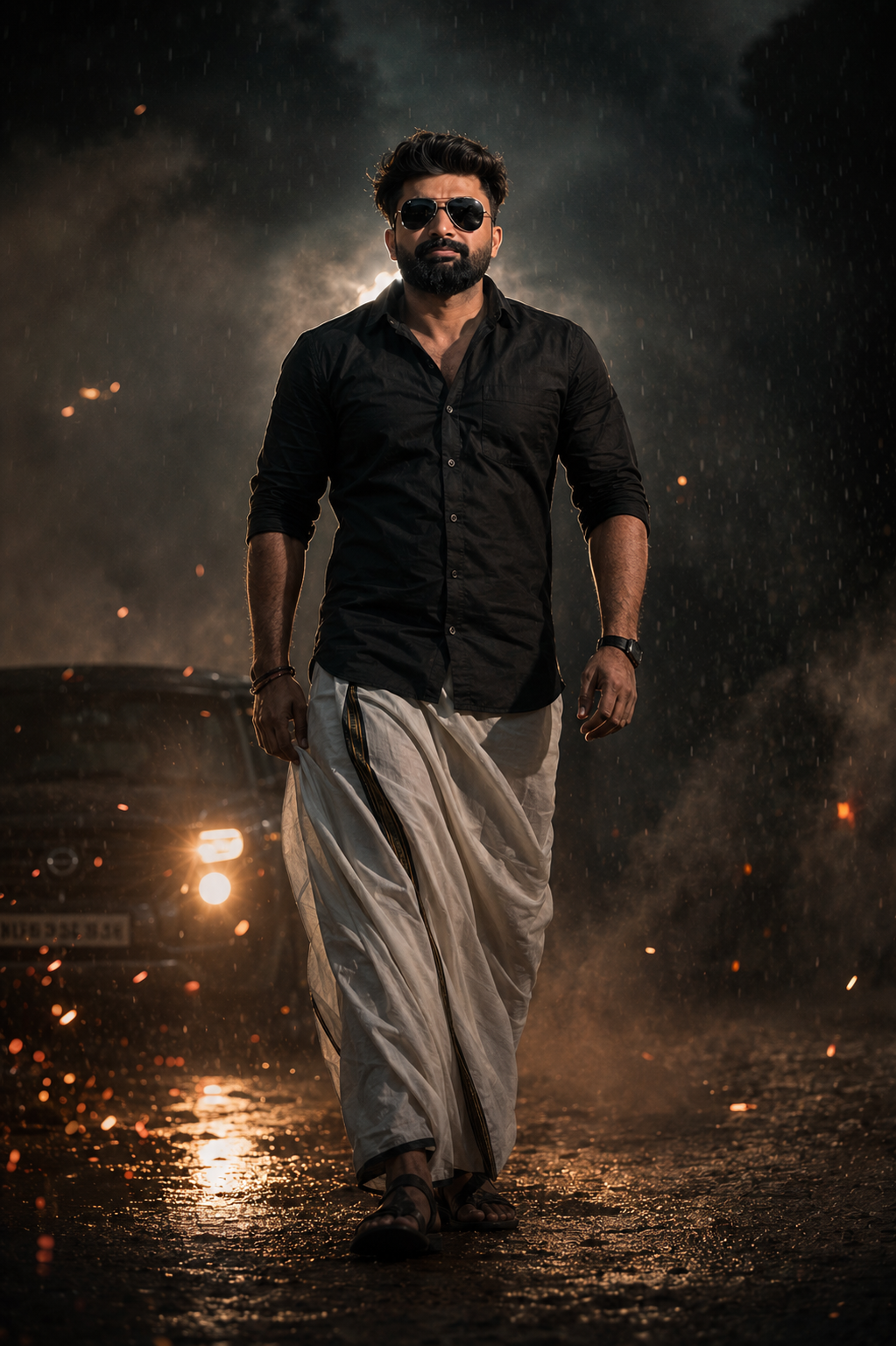
A matte black shirt, a naturally draped mundu or dhoti and a line of light behind the shoulders give this portrait its starting point. Storm clouds, a wet surface and distant headlights then build the atmosphere around the person.
This ChatGPT prompt is designed to give your uploaded photograph a dark mass-hero movie-still treatment. The goal is to keep your face recognisable and naturally textured while changing the clothing, lighting and surroundings. The sample on this page shows the intended style; your own photograph supplies the personal reference.
The requested scene is outdoors under a stormy sky. Light rain mist, smoke and a restrained scattering of particles create depth, while the ground carries soft reflections. Car headlights remain in the background as a glow rather than taking attention away from the portrait.
The face should stay readable within that darker environment. A rim light outlines the person from behind, and subtle warm highlights bring out facial detail. The orange-and-teal colour treatment adds warmth to selected highlights and cooler tones to the surroundings.
For a convincing finish, the clothes, face and environment need to feel connected by the same lighting. The person should look part of the scene rather than like an unchanged photo placed over a dramatic background.
The photograph is uploaded inside ChatGPT. This website provides the sample and prompt, while your attached photo becomes the reference for the edit. Image generation and editing must be available in your ChatGPT account or workspace.
A well-lit source photograph is useful even though the finished scene is dark. Visible facial features give you a clearer basis for checking likeness. If retaining the mundu or dhoti matters, choose a source photo that shows its drape and as much of the outfit as possible.
The prompt strongly prioritises facial identity, expression, proportions and skin texture. Start your review there: compare the eyes, nose, mouth, jawline and hairstyle with your original photo before judging the storm effects.
Low-key lighting creates darker areas and strong contrast. Some facial colour will also respond to the warm highlights and cool surroundings. The useful goal is to retain your underlying complexion and features while allowing the new lighting to appear natural.
If the edit smooths or reshapes your face too much, try this follow-up:
Refer back to my original uploaded photo. Preserve my facial proportions, expression, hairstyle and natural skin texture. Keep my underlying skin tone consistent while applying the scene's lighting. Retain realistic detail without beauty-filter smoothing or facial reshaping.
“Keep the face 100% identical” communicates a strong preference, but it does not guarantee an exact match. A similar head angle and expression can make comparison easier than a completely new viewpoint.
The shirt is meant to have a matte black finish. Look for visible folds and a readable shoulder shape rather than a shiny, leather-like surface. Subtle lighting along the edges can separate the black fabric from the dark background.
The mundu or dhoti should remain a recognisable cloth garment with a coherent drape. Where those details are visible in your source photo, check the waist, folds and lower edge against it. A strong cinematic treatment should not turn the garment into trousers or an unrelated costume.
The requested wind movement is slight. A modest shift at the loose edge can suggest weather without making the fabric appear rigid or stretched. If the clothing changes too much, ask:
Keep the mundu or dhoti drape based on my original photo, with natural folds and only slight movement at the loose edge. Retain the matte black shirt and avoid exaggerated fabric motion.
The prompt includes clouds, mist, smoke, dust and sparks. Giving every effect equal emphasis can make the scene crowded. Use the person as the visual priority, then decide which background details actually support the mood.
Shallow depth of field and cinematic blur are intended to soften the surroundings. Check that the blur leaves the face and important clothing details clear, rather than spreading across the whole portrait.
This prompt asks for a subtle change toward a medium gym physique. That is a body edit as well as a styling change. Review the shoulders, arms, torso and their relationship to the face so the result remains proportionate.
If you prefer your original build, you can remove that part of the transformation with a direct instruction:
Keep my original body shape and proportions from the uploaded photo. Apply the clothing, lighting and background changes without adding muscle size or altering my build.
If you keep the requested enhancement, ask for a restrained result. A more fitted shirt or stronger lighting can already change how the body reads, so inspect the overall proportions before asking for further changes.
The following are suggested adjustments to try, rather than verified fixes from a test of this particular prompt.
Ask for one main correction at a time and identify the details you want to retain. Inspect each revision, since changes can affect areas beyond the one you requested.
You can keep the main idea while adjusting its intensity. Request lighter mist for a cleaner portrait, fewer sparks for a quieter scene, or a softer headlight glow if the background feels too busy.
For a more restrained colour treatment, ask for subtle cool shadows and warm highlights while keeping the overall palette closer to natural colour. To retain more of the source photo, request the same pose and framing instead of introducing a new camera angle.
The original prompt asks for no text. Keep the artwork free of added titles or captions if that is the version you want. If you later need poster lettering, leave suitable space and add the text separately in your preferred design editor.
The cinema-camera and “85mm lens look” wording describes the visual character being requested. It does not mean that the generated image was captured with a physical cinema camera or that it reproduces a particular optical setup exactly.
Similarly, “8K detail” is not proof of the exported image's dimensions. Check the downloaded image's dimensions in pixels when preparing it for display or print. Judge the visible facial detail and fabric texture alongside the dimensions.
Before saving, view the portrait at its intended display size and then inspect it closely. Check the face, hands, clothing edges, garment folds and areas where the subject meets smoke or mist. The aim is a photographic-looking edit within an invented scene, not an unaltered photograph.
No. The copied prompt requests the outdoor setting and weather effects. A clear, well-lit photograph is useful for showing the facial details you want the edit to retain.
A source photo showing the garment is preferable if you want its existing drape preserved. If it is not visible, ChatGPT will need to create those clothing details rather than retain them from the photograph.
Yes. Ask ChatGPT to keep your original build and apply only the clothing, lighting and environment changes. The physique instruction is a styling choice, not a requirement for the scene.
The prompt prioritises likeness, but an exact match cannot be guaranteed. Compare the result with your original photograph and request specific corrections to features or expression when needed.
Upload it in ChatGPT together with the copied prompt. Use this website to view the sample and copy the instructions, then open the ChatGPT link below the prompt.